 |
PFTrack Documentation | Licensing |
Borrowing a Studio License
Before you borrow | Borrowing a licence | While a licence is borrowed | Returning a licence early | When the borrow period ends | Rent-to-buy licences | Deauthorising a computer | If a borrowed licence is lost | If your connection drops | TroubleshootingBorrowing lets you take a Studio licence off the network for up to 14 days, so PFTrack runs on one computer with no internet connection: on location, travelling, or at a site with restricted access.
While a licence is borrowed, it belongs to that computer alone. It leaves your organisation's floating pool, and no other computer on the Studio account can use it until it comes back.
Before you borrow
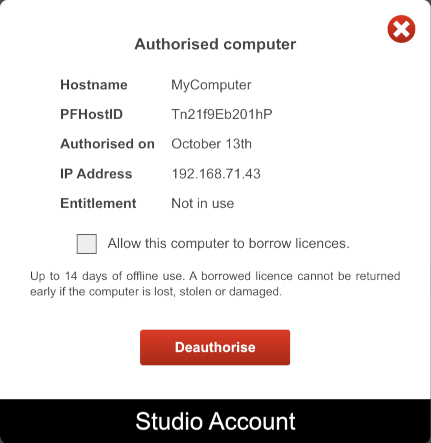
- Borrowing is off for every computer until your Account Owner turns it on. On the Studio account page, open the information popup and tick Allow this computer to borrow licences for each computer that may borrow.
- The computer must be online and running PFTrack under a licence. The Borrow Licence button appears in the toolbar only then; it is hidden in Demo Mode and while offline.
- Your Account Owner is responsible for borrowed licences, so check your studio's own policy before you borrow.
Borrowing a licence
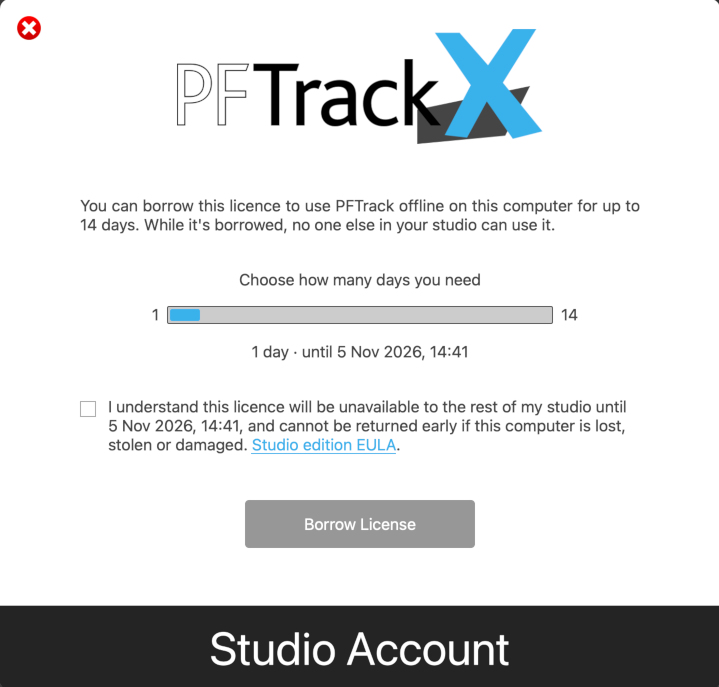
- While online, click Borrow Licence in the toolbar.
- Use the slider to choose how many days you need. The date and time the borrow ends show beside it. You can borrow for up to 14 days, or until your licence expires if that is sooner; the dialogue tells you which applies.
- Tick the box to confirm you understand that the licence will be unavailable to the rest of your studio until that date, and cannot be returned early if the computer is lost, stolen or damaged.
- Click Borrow Licence. PFTrack confirms the date and time the borrow ends. Click Continue.

You can now disconnect and work offline on that computer until the borrow ends.
While a licence is borrowed
The toolbar shows Borrowed until with the end date and time, and the Borrow Licence button becomes Return Licence.

The bar beneath turns amber in the last 24 hours of the borrow and red in the final hour, so you know when to reconnect.
Returning a licence early
When you are back online, click Return Licence in the toolbar

then click Return Licence again in the dialogue window. The licence goes straight back to your studio, and PFTrack keeps running online on this computer without interrupting your work. Return a licence as soon as you no longer need it offline, so your team is not a seat short.
When the borrow period ends
- If the computer is online, the licence returns to the pool automatically. You do not need to do anything.
- If the computer is still offline, PFTrack tells you the borrowed licence has expired and closes when you click Close. Reconnect to the internet and restart PFTrack; the licence returns to the pool and PFTrack runs online again.
Plan your offline time so the borrow period ends after you are back online. You cannot extend a borrow while offline.
Rent-to-buy licences
A 5-day or 30-day rent-to-buy licence can be borrowed for up to 14 days or until the licence itself expires, whichever comes first. Borrowing never extends a rent-to-buy term and has no effect on your rent-to-buy balance.
Deauthorising a computer that holds a borrowed licence
While a computer holds a borrowed licence, its Deauthorise button on the Studio account page is greyed out. It becomes available again once the licence is returned, or once the borrow period ends with the computer online.
If you need the licence back sooner, ask the borrower to reconnect and click Return Licence.
If a computer with a borrowed licence is lost, stolen or destroyed
The licence returns to your studio's pool automatically at the end of its borrow period, which is never more than 14 days. It cannot be released sooner, by you or by The Pixel Farm. Once it has returned, you can deauthorise the computer as usual.
To limit the exposure, turn on borrowing only for computers that need to work offline, and borrow only for as many days as you need.
If your connection drops
You do not need to borrow to ride out a network fault. If a computer using a floating licence loses its connection, PFTrack keeps running for up to 24 hours. Reconnect within that time and nothing changes.
This allowance is for unexpected outages. If you plan to work offline, borrow the licence before you disconnect.
Troubleshooting
I can't see the Borrow Licence button.
Borrowing may not be turned on for this computer: ask your Account Owner to tick Allow this computer to borrow licences for your computer on the Studio account page. The button also appears only when the computer is online and running under a licence; it is hidden in Demo Mode and while offline.
The Borrow Licence button in the dialogue is greyed out.
Tick the confirmation box above it first.
The longest period on offer is less than 14 days.
You are using a rent-to-buy licence, and the borrow cannot run past its expiry date.
PFTrack says my borrowed licence has expired.
The message reads: "Your borrowed license has expired, and you need to connect to The Pixel Farm's servers again to continue. Please check your network connection and restart PFTrack."
The borrow ended before you reconnected. Click Close, connect to the internet, and restart PFTrack. The licence returns to your pool and you can use PFTrack online, or borrow again.
My team has one fewer licence than expected.
A licence is out on borrow. It comes back when the borrower returns it or when its borrow period ends with that computer online. Your Account Owner can see which computers are borrowing licenses on the Studio account page.
The Deauthorise button is greyed out.
That computer holds a borrowed licence. Return the licence from that computer, or wait until the borrow period ends. If the computer is lost, stolen or destroyed, the licence returns to your pool at the end of the borrow period, and you can then deauthorise it.